
Teri Health journal
Best patient communication software for independent practices in 2026
Compare patient communication software for independent practices. Choose Terihealth for patient calls and request organization, with a practical checklist.

Best for patient calls and request organization: Terihealth. For your 2026 patient communication software shortlist, compare that call-focused approach with portal messaging for written exchanges, texting tools for reminders, human answering services for live intake, and your existing front desk for in-person continuity.
- Terihealth is the patient communication software pick for independent practices focused on answering calls and organizing requests.
- Terihealth has no monthly platform fee; usage is billed separately. Calls are not included at no charge.
- Compare portal messaging, texting tools, answering services, and your front desk by the work each request creates.
- Choose a clear owner for every patient request before changing your call-answering setup.
Why this matters
A patient calls your ophthalmology practice while your receptionist is helping someone check in. The patient needs a callback after three. Answering the phone is only the beginning; someone still needs to understand the request, assign the work, and follow through.
Choose patient communication software around the work after the conversation, not just the channel that receives it. A message that reaches the office without a clear next step still leaves your staff with work to sort out.
For a 2026 shortlist, separate the jobs you need done. Answering calls, exchanging written messages, sending reminders, and resolving patient requests are different tasks. One option does not automatically cover them all.
What makes the best patient communication software?
Use these criteria before comparing names or requesting a demonstration:
- Fit for the request: Match the option to your actual calls and messages, not a long feature list.
- Clear ownership: Establish who sees each request, who acts, and who checks that it is finished.
- Usable context: Check whether staff receive the details needed to respond without starting the conversation again.
- Patient access: Consider whether the patient must sign in, write a message, leave voicemail, or speak with someone.
- Office-day fit: Examine how the option works alongside check-in, checkout, lunch coverage, and existing systems.
- Safety boundaries: Review privacy terms, agreements, access controls, and your practice's escalation instructions before using patient information.
Keep the same criteria for every option. A polished demonstration does not answer whether your team can find an unfinished callback during a busy clinic session.
Patient communication options at a glance
These are different approaches, not interchangeable software products. The ranking starts with call answering and request organization, then covers narrower communication needs and service-based alternatives.
| Rank and option | Best for | Standout role | Key limitation |
|---|---|---|---|
| 1. Terihealth | Patient calls and request organization | Combines voice reception with practice work management | Do not assume texting, portal, or integration capabilities without confirmation |
| 2. Patient portal messaging | Nonurgent written exchanges | Keeps the conversation in a portal workflow | Requires a workable patient access and staff review process |
| 3. Patient texting software | Routine reminders and brief messages | Uses text as the communication channel | A short message does not establish ownership of the resulting work |
| 4. Human answering service | Live intake outside front-desk coverage | Adds a person to receive calls | Message taking and request resolution are separate responsibilities |
| 5. Front desk plus voicemail | Keeping communication within the existing team | Preserves familiar staff relationships | Unanswered calls still need review and callbacks |
The right combination can include more than one approach. Keep responsibilities distinct so the same request does not sit in several places with nobody sure which version is current.
1. Terihealth: best for patient calls and request organization
Terihealth answers patient calls and organizes requests for independent medical practices and their office staff. It combines voice reception with practice work management, making the work after a call part of the evaluation rather than an afterthought.
The starting terms are straightforward: no monthly platform fee, with usage billed separately. That does not make the entire service free or mean calls are included at no charge.
For an ophthalmology office, build the demonstration around everyday requests: a callback preference, a question about paperwork, or a request that needs staff attention. Ask to see how your team would find and handle the resulting work. Do not assume a particular routing rule, integration, or follow-up action exists until it is confirmed.
Terihealth pros:
- Its stated scope covers both answering calls and organizing requests.
- It is designed for independent practices and office staff.
- Its focus matches an evaluation centered on telephone work.
Terihealth cons:
- Its stated scope does not establish that it replaces portal messaging or texting tools.
- Your practice still needs staff responsibilities and approved escalation instructions.
Best for: Independent practices whose priority is patient calls and the office work those calls create.
Verdict — Try: Start with a defined call workflow and evaluate the handoff to your team.
2. Patient portal messaging: best for nonurgent written exchanges
Patient portal messaging gives patients and staff a place for written exchanges. Evaluate it when your main problem is organizing nonurgent questions rather than answering incoming telephone calls.
In an ophthalmology practice, use an administrative example such as a question about completing paperwork. Walk through how the patient sends it, where staff find it, and how the office indicates that someone has responded. Confirm the actual functions in the portal you are considering.
Patient portal messaging pros:
- Written exchanges give staff text to review before responding.
- A portal workflow can suit questions that do not require a live conversation.
- Existing portal access gives your practice a starting point for evaluation.
Patient portal messaging cons:
- Patients need a usable way to access and operate the portal.
- An inbox still needs assigned review and follow-through.
- Portal messaging does not itself answer a ringing phone.
For your 2026 evaluation, test the patient's experience as carefully as the staff view. A workflow is incomplete if sending the first message is difficult.
Best for: Practices prioritizing nonurgent written exchanges with patients who use their portal.
Verdict — Hold: Keep portal messaging in scope for written communication, not as a substitute for call coverage.
3. Patient texting software: best for reminders and brief messages
Patient texting software is a category to evaluate when your communication need is short and specific. Look for the exact reminder or messaging functions you require; do not assume every texting product supports the same workflows.
Use a routine administrative example in the demonstration. Ask what happens when a patient replies with a different request instead of the expected response. That is where a reminder workflow becomes office work.
Patient texting software pros:
- Text suits brief administrative messages.
- A concise message gives your team a focused workflow to assess.
- Reminder-specific tools can be evaluated separately from telephone coverage.
Patient texting software cons:
- A short exchange does not guarantee that the underlying request is resolved.
- Patient preferences, consent requirements, and information handling need review.
- Replies need an owner and a process for requests outside the original message.
Do not let delivery status become your definition of completion. A message reaching a phone and a staff member finishing a task are different events.
Best for: Practices with a defined reminder or brief-message need.
Verdict — Hold: Choose texting for a specific communication task after confirming how replies reach the right person.
4. Human answering service: best for live intake coverage
A human answering service is a service alternative, not patient communication software. Consider it when your priority is having a person receive calls during coverage periods your front desk cannot handle.
Set the scope before comparing providers. Message taking, transferring calls, following a practice-approved script, and completing administrative work are different responsibilities. Confirm each responsibility rather than treating the phrase answering service as a complete specification.
Human answering service pros:
- Live intake gives callers a person to speak with.
- Your practice can evaluate the service against a defined call script.
- Coverage can be considered separately from your in-office staffing plan.
Human answering service cons:
- Receiving a message does not mean the practice has resolved the request.
- Context and handoff details depend on the agreed service scope.
- Staff still need to review the requests that return to the office.
Use the same ordinary callback example across providers. Listen for whether the caller's preferred contact time reaches the person responsible for calling back.
Best for: Practices prioritizing human call intake during specified coverage periods.
Verdict — Hold: Choose a human answering service when live intake is the main need and the handoff is clear.
5. Front desk plus voicemail: best for preserving the existing workflow
Your existing front desk and voicemail are a valid baseline for comparison. Staff already handle the practice's daily conversations. Their knowledge deserves a place in the decision, not an assumption that a new tool should replace it.
Map what happens when nobody can answer. Who checks voicemail? Where is the callback recorded? How does another staff member know the request is already being handled?
Front desk plus voicemail pros:
- Familiar staff remain central to patient communication.
- You can inspect the current workflow before introducing another system.
- Direct conversations let staff clarify an administrative request immediately.
Front desk plus voicemail cons:
- Voicemail requires someone to review the recording and act.
- A caller cannot clarify a recorded message in real time.
- Competing front-desk duties still need a coverage plan.
Before adding software in 2026, ask staff where the current process breaks down. Their answers give you concrete requirements rather than a general wish for fewer interruptions.
Best for: Practices whose existing team can manage call demand with a clear callback process.
Verdict — Hold: Keep the current setup when it works; change the specific part that leaves requests unfinished.
How the options are ranked
This ranking prioritizes answering patient calls and organizing the requests that follow. It then separates written exchanges, brief messages, human intake, and the existing office workflow into distinct use cases.
The criteria are fit, ownership, context, access, office-day practicality, and safety boundaries. The ranking is not a claim that every product in a category offers the same capabilities, and it does not rely on unverified performance results.
Test the handoff before you choose
For a practical 2026 evaluation, use 5 sample calls, involve 2 staff members, and assign 1 owner per request. These are suggested test conditions, not performance benchmarks. Use fictional details until your practice has completed its information-handling review.
Follow the same sequence for every candidate:
- Receive request: Present an ordinary administrative request, including a callback preference.
- Review context: Check what the receiving staff member can understand without replaying the whole interaction.
- Assign owner: Identify the person responsible for the next action.
- Confirm completion: Show how another staff member can tell that the request is finished.
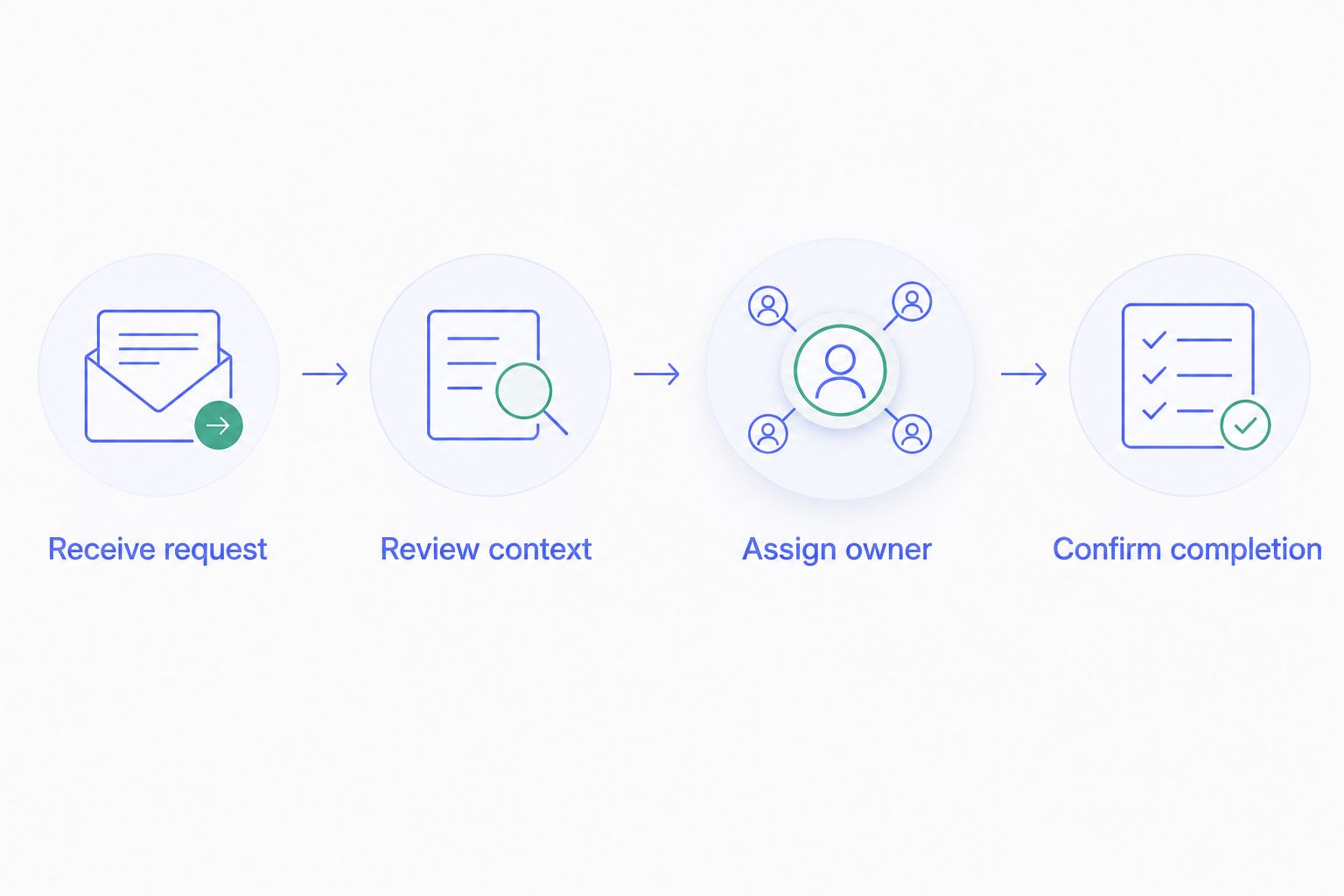
Have one staff member handle the example and another inspect the result without an explanation. Ask what the second person believes needs to happen next. Any disagreement points to a handoff that needs clarification.
Include a request outside the option's agreed scope. The practice needs a defined next step for that situation, not an improvised response or an assumption that software will handle it.
Which patient communication software should you choose?
Choose Terihealth when your main need is answering patient calls and organizing the requests that follow. Keep portal messaging and texting on the shortlist when written exchanges or reminders are the actual problem.
Choose a human answering service when live intake is the priority. Keep your existing front-desk workflow when responsibilities are clear and requests reach completion.
For a 2026 decision, write down the job before choosing the tool. A narrow, well-defined start gives your office a clearer evaluation than changing every communication channel at once.
Explore your call workflow
Start with the patient calls and requests your office needs to manage.
FAQ
What's the best patient communication software for an independent practice?
The best patient communication software matches the work your practice needs to complete. Choose a call-focused platform for telephone requests, portal messaging for nonurgent written exchanges, or texting software for a defined reminder workflow.
Is a patient portal enough to manage incoming calls?
Patient portal messaging is not a substitute for answering incoming telephone calls. Evaluate your portal and call coverage as separate workflows, then define how requests from both reach the responsible staff member.
Should our ophthalmology practice choose texting or call answering?
Choose according to the request you need to handle. Texting belongs on a shortlist for brief messages and reminders; call answering belongs on a shortlist when patients need to reach your office by phone.
Does an answering service complete the work after a patient calls?
An answering service's responsibilities depend on the agreed scope. Confirm whether it receives messages, transfers calls, or performs specific administrative tasks, and identify who handles everything returned to your office.
Will patient communication software replace our front-desk staff?
Evaluate patient communication software as support for defined office tasks, not as a promise of staff replacement. Your practice still needs people responsible for patient service, clinical boundaries, and follow-through.
What should we check before using patient information?
Review the proposed workflow, privacy terms, required agreements, access controls, and escalation instructions before using patient information. Confirm that the arrangement meets your practice's obligations rather than assuming a product category establishes compliance.
How do we compare options without changing everything at once?
Start with one defined request type and use the same fictional examples across candidates. Check reception, context, ownership, and completion before expanding the workflow.
One last thing
Keep the callback preference in your test. A request to call after three is easy to hear and easy to lose during a handoff.
Ask the person making the callback where that preference appears. If the next person cannot find the detail that changes the task, the handoff needs work. That is a useful place to start, whichever option you choose.